
MiniApp UniqueID
UniqueID Mechanism Description
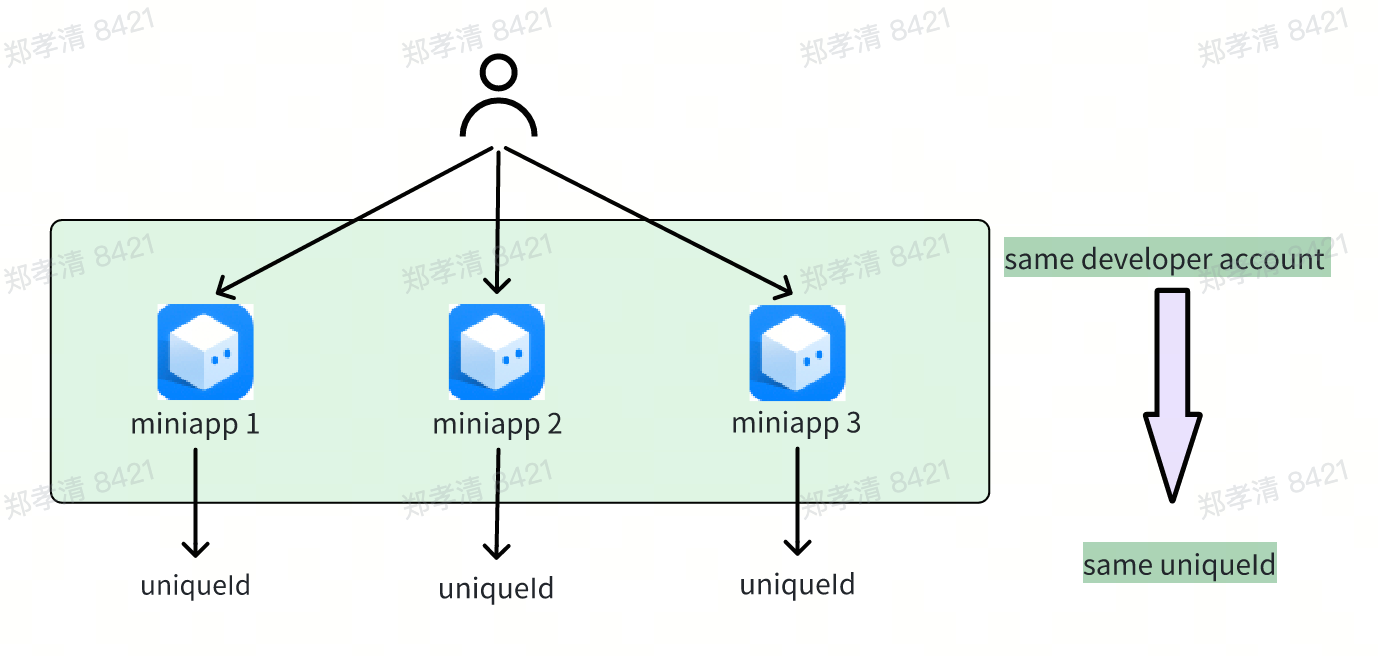
If developers own multiple Dlightek mini programs, they can use a UniqueID to distinguish the uniqueness of users. This is because as long as it is the same Dlightek mini program operation platform account, the UniqueID for users is unique. In other words, for the same user across different mini programs under the same Dlightek mini program operation platform, the UniqueID is the same.
How to Obtain UniqueID
For mini programs created through a developer account, one can obtain the UniqueID through the dlt.getUniqueId method.
Usage Instructions
The API reference for Unique User Identifier (UniqueId) mainly introduces the interface's request syntax, the meaning of related parameters, as well as examples of requests and responses.
Resource Terminology
| Name | Field Name | Description |
|---|---|---|
| MiniApp Unique User Identifier ID | uniqueId | MiniApp unique user identifier ID, used to uniquely identify users under the same account entity |
API Documentation
Introduction
The API to obtain the uniqueId is used by developers to obtain a uniqueId within a mini program.
API
Input Parameters: None
Callback Function
Is of Object type, with the following properties:
| Property | Type | Description |
|---|---|---|
| uniqueId | string | MiniApp unique user identifier id, used to uniquely identify users under the same account entity |
| success | string | True for success, false for failure |
{
  "success": "true",
  "uniqueId": ""
}
Example
dlt.getUniqueId({
  success: (res) => {
    console.log(res); // On success returns {uniqueId: "xxx"}
  },
  fail: (res) => {
    console.log(res); // On failure returns
  },
  complete: (res) => {
    console.log(res); // Callback function that is called when the interface call ends (will execute on both success and failure), returns content consistent with the corresponding content of success/failure
  },
});
Use Case Examples
MiniApp Message Sending
Scenario: Mini programs support the functionality for developers to push messages to specified uniqueIds. After creating a message, developers can push this message to a specified uniqueId (user), and users can see the message on the Dlightek phone's negative one screen as well as in the miniapp box.
For more information, see: Message Introduction
MiniApp Card Push
Scenario: Mini programs support the function of pushing card materials to specified uniqueIds. Users can see the specified card materials on the negative one screen of Dlightek phones.
For more information, see: Static Card Introduction